
Tech , SaaS
AI and Code: How Artificial Intelligence Is Reshaping Software Development

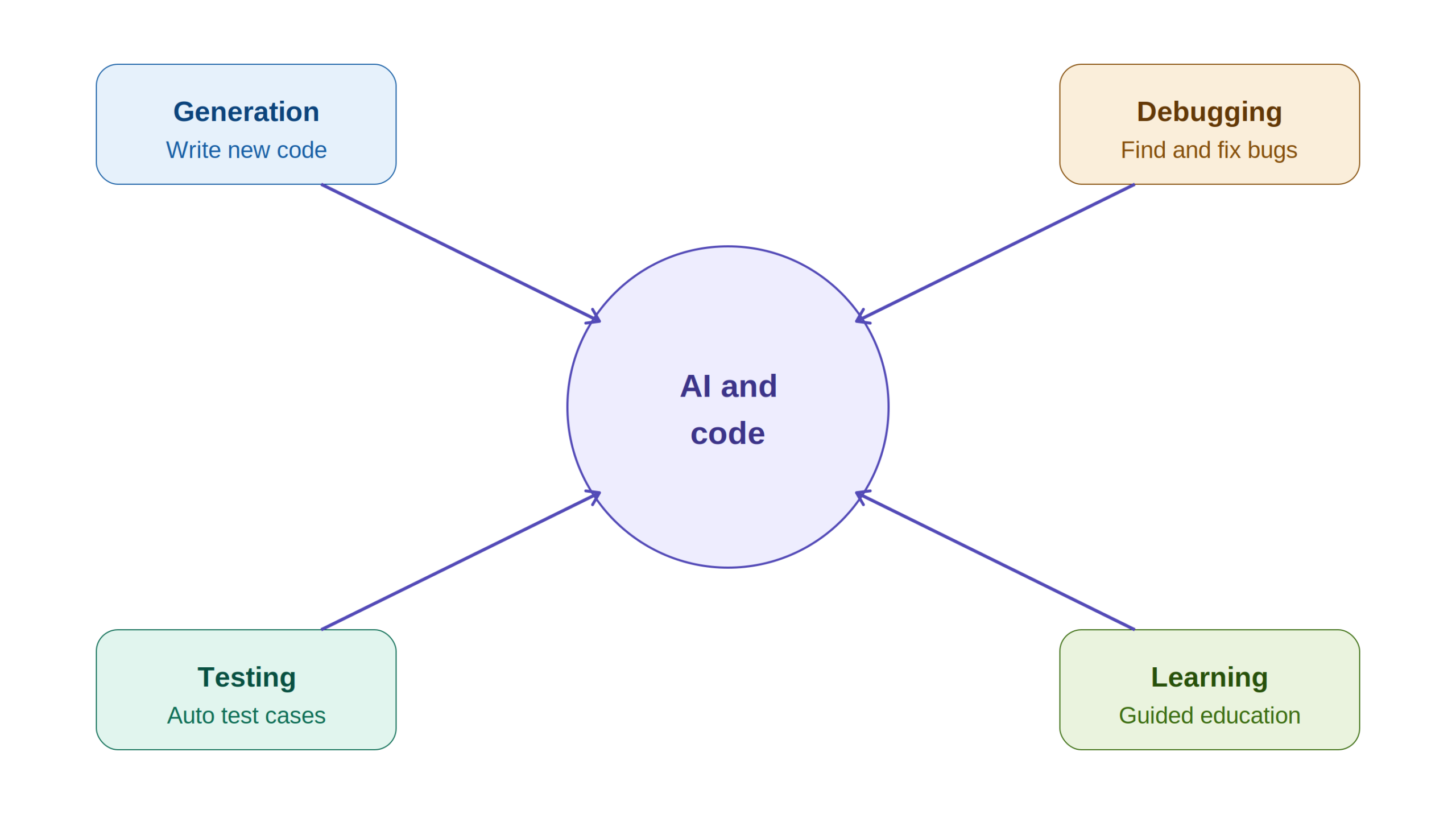
Software development looks noticeably different than it did just a few years ago. A layer of artificial intelligence now sits quietly inside the editors developers already use, watching what gets typed, suggesting what comes next, and increasingly handling entire chunks of work that used to require a human typing every character by hand.
This shift touches nearly every stage of building software, from the first line of a new function to the final test run before something ships. What makes this moment particularly interesting is not just that these tools exist, but how quickly they have become a default part of the workflow for developers at nearly every experience level, from students writing their first program to senior engineers maintaining massive production systems.
In this guide, we will walk through what it actually means for code to involve AI, where this technology is being applied right now, what it genuinely offers, and where the real risks and open questions still sit.
What Does It Actually Mean for Code to Involve AI
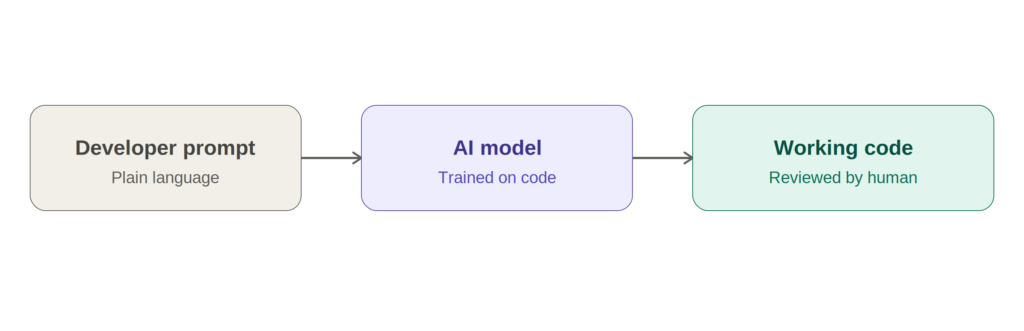
At its core, AI assisted code refers to software that gets written, generated, or improved with help from artificial intelligence systems. These systems typically rely on natural language processing, machine learning, and neural networks trained on enormous amounts of existing code, which allows them to understand what a developer is trying to do and produce or refine code accordingly.
A handful of well known tools illustrate this well. GitHub Copilot offers real time suggestions as developers type. ChatGPT and similar conversational assistants can turn a plain language request into a working code snippet or explain what a confusing block of code is actually doing. Tabnine focuses specifically on privacy conscious code completion that can run locally rather than sending code to an external server. Each of these tools approaches the same underlying problem, closing the gap between an idea and working code, from a slightly different angle.
Where AI Is Actually Being Used Across Development
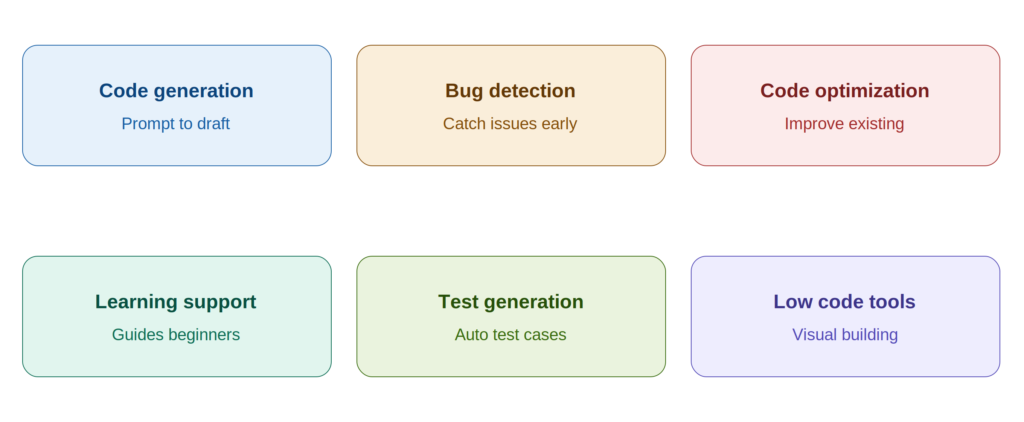
AI is not just speeding up a single part of the development process. It has found its way into nearly every stage, often in ways that genuinely change how developers spend their time.
Generating code from a description. Perhaps the most visible use case is straightforward code generation. A developer describes what they need, whether that is a single function or a rough outline of an entire feature, and the tool produces a working first draft. This cuts down significantly on the time spent typing out repetitive, predictable code that does not require much original thought. Over time, many developers find this shifts their own role slightly, spending less time on the mechanics of typing syntax and more time thinking carefully about what the code actually needs to accomplish and reviewing whether the generated draft actually does that correctly.
Catching bugs before they become expensive. AI powered analysis tools can scan a codebase looking for bugs, inefficiencies, or security vulnerabilities that a human reviewer might miss during a quick pass. Tools built specifically for this purpose, such as static analysis platforms that flag insecure patterns, help teams catch issues earlier in the process rather than discovering them after deployment.
Improving code that already works. Optimization is a quieter but genuinely valuable use case. Rather than generating new code, these tools look at existing code and suggest ways to make it faster, more readable, or better structured, all while preserving what it actually does. This kind of refactoring assistance is particularly useful in older codebases that have accumulated technical debt over time.
Helping people learn to code in the first place. AI powered tutors and coding assistants give beginners real time explanations, help with debugging, and personalized guidance as they work through unfamiliar concepts. For someone just starting out, having an assistant that can explain why a piece of code fails, rather than just pointing out that it does, meaningfully shortens the learning curve.
Generating and maintaining automated tests. Testing frameworks increasingly lean on AI to generate test cases, anticipate edge cases a developer might not think to check, and simulate realistic user behavior. This kind of automated test generation reduces the manual burden of building thorough test coverage, which historically has been one of the more tedious and easily neglected parts of shipping reliable software.
Making development accessible without deep coding knowledge. Low code and no code platforms, increasingly powered by AI, let people with little to no formal programming background build working applications through visual interfaces and natural language prompts. This is quietly expanding who actually gets to build software, beyond the traditional pool of trained engineers.
The Real Benefits This Technology Brings
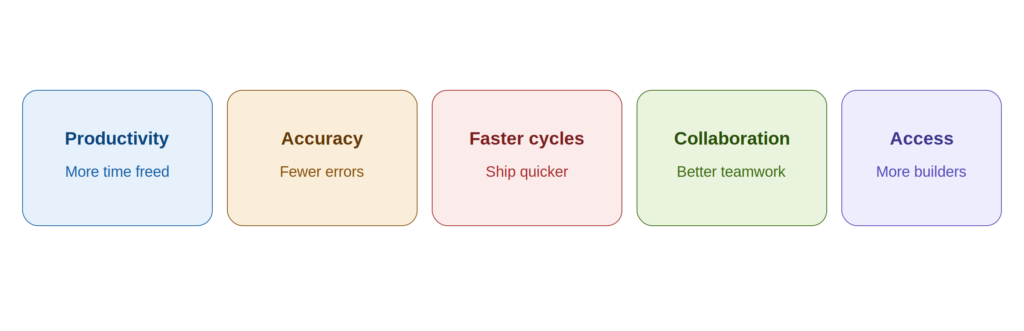
Developers get real time back. Automating routine, repetitive work frees up time for the parts of a project that genuinely require creative problem solving and careful judgment, rather than mechanical typing.
Fewer careless mistakes slip through. In large, complex codebases especially, AI tools help catch the kind of small human errors that are easy to miss during a long day of coding, contributing to more reliable software overall.
Projects move faster from idea to shipped feature. When code generation, bug detection, and improvement suggestions all happen faster, the entire development timeline compresses, without necessarily sacrificing quality along the way.
Teams communicate and collaborate more smoothly. AI tools can help generate clearer documentation, assist during code reviews, and nudge different developers toward more consistent coding practices, which matters enormously as teams grow larger.
More people get to participate in building software. Low code and no code tools open up software creation to people who understand a problem deeply, such as domain experts or small business owners, but never formally trained as developers. That expands who gets to turn an idea into something real.
The Challenges and Ethical Questions Worth Taking Seriously
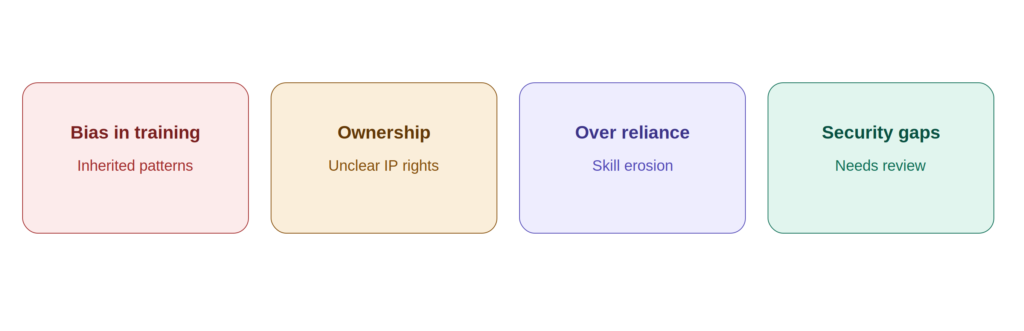
Despite the clear upside, adopting AI into the coding process raises questions that deserve honest attention rather than being brushed aside.
Bias baked into training data. AI systems inherit whatever patterns exist in the data they were trained on, which means biased or outdated practices in that training data can quietly show up in the suggestions a tool offers, sometimes in ways that are not immediately obvious.
Who actually owns AI generated code. This is a genuinely unresolved question in many jurisdictions. When a tool generates a function based on a prompt, it is not always clear whether ownership belongs to the person who wrote the prompt, the company that built the AI system, or falls into some kind of ambiguous middle ground. Teams working with AI generated code in commercial products should pay close attention to this as legal frameworks continue to catch up with the technology.
The risk of leaning on it too heavily. Developers who rely on AI suggestions for nearly everything risk losing some of the deeper problem solving instincts that come from working through difficult logic manually. This matters most for junior developers who are still building that foundational skill set in the first place.
Security is not automatic. AI generated code can just as easily introduce a vulnerability as it can help catch one, particularly since these tools sometimes learn from code that was never especially secure to begin with. Every organization using AI assistance should treat thorough review and validation as a mandatory step rather than an optional nicety.
Consistency across a growing codebase. As more developers on a team lean on different AI assistants, or the same assistant configured differently, subtle inconsistencies in style, naming conventions, and architectural choices can creep in. Without some agreed upon standards for how AI suggestions get reviewed and accepted, a codebase can end up feeling stitched together from several different hands even when a single person wrote most of it.
Knowing when not to use it. Not every coding task benefits from AI assistance. Highly specialized business logic, code touching sensitive financial calculations, or anything where a single subtle mistake carries serious consequences often deserves the slower, more deliberate process of a human thinking it through from scratch, with AI suggestions treated as a secondary check rather than the primary source of the logic itself.
Where This Is Likely Heading Next
Looking ahead, a few directions seem particularly likely to shape how this technology develops further.
Coding assistants that adapt to how you personally work. Rather than offering generic suggestions, future tools may increasingly learn an individual developer’s specific habits, preferred patterns, and typical mistakes, becoming something closer to a personalized assistant than a general purpose tool.
Debugging that goes beyond simply flagging problems. Instead of just pointing out that something is broken, future tools are likely to fix issues directly and explain exactly what they changed and why, turning what used to be a frustrating detour into something closer to a quick learning moment.
A tighter, more natural relationship between developers and their tools. As these systems get better at understanding context and intent, the line between writing code yourself and directing an AI assistant to write it for you will likely continue to blur, without eliminating the need for a human who understands the actual problem being solved.
Bringing It All Together
AI woven into the coding process represents more than a passing trend. It is a genuine shift in how software gets built, from generating boilerplate to catching bugs early to helping newcomers learn faster than they otherwise could. At the same time, none of this removes the need for human judgment. The organizations getting the most value from this shift tend to be the ones that treat AI as a genuinely useful collaborator, not a replacement for the people who actually understand the problem being solved and take responsibility for what ships.
Balancing that human oversight against the real productivity gains AI offers is really the central challenge for any team adopting these tools seriously, and it is likely to remain that way for the foreseeable future. Teams that get this balance right tend to treat every AI generated suggestion the same way they would treat a suggestion from a junior colleague, useful, often quite good, but never above scrutiny.
Frequently Asked Questions
Can AI actually generate useful test cases for an application? Yes. AI can analyze an existing codebase and identify scenarios worth testing, and more advanced automated testing platforms can go further by capturing real usage patterns during runtime and converting them directly into test cases, which helps ensure more realistic and comprehensive coverage than manually written tests alone.
How well do these tools handle old, legacy codebases? AI tools can help developers understand unfamiliar legacy code, flag outdated patterns, and suggest updates that bring it closer to modern standards. Some more advanced tools can also generate tests specifically for legacy code, which helps ensure nothing breaks during a refactor.
Is AI generated code actually safe to use in production? It can be a strong starting point, but it still requires genuine human review before going anywhere near production, particularly around security, reliability, and whether it actually fits the specific standards of that particular project.
Will AI eventually replace human QA engineers? Not in any meaningful sense. AI is excellent at automating repetitive testing tasks and generating a broad set of test cases, but human QA engineers bring critical thinking, contextual judgment, and domain expertise that these tools simply do not replicate. AI works best as something that augments a QA team’s work, not something that replaces it.
How do AI powered development tools typically fit into existing workflows? Most modern tools in this space are built to integrate directly into existing CI/CD pipelines, generating suggestions, catching issues, or producing test cases as part of the normal development and deployment process, which keeps disruption to a team’s existing workflow to a minimum while still improving overall software quality. Teams adopting these tools for the first time generally find the smoothest path is starting small, perhaps with a single repository or one specific use case like automated test generation, before rolling the approach out more broadly once the team has a feel for how much to trust the output.
B2B marketing has rarely felt easy, and right now it feels harder than usual. Budgets are tighter, teams are leaner, and everyone is expected to prove a return on every campaign. At the same time, businesses keep adding new channels and strategies, which makes tracking everything by hand close to impossible.
This is where AI earns its place. Used well, it can take over the repetitive parts of marketing, surface insights faster than any manual report, and help a small team operate like a much larger one. Instead of listing dozens of products, this guide looks at the specific problems B2B marketers face and shows which kinds of AI solutions help, how to use them, and what to watch out for.
Why B2B Marketing Needs AI Right Now
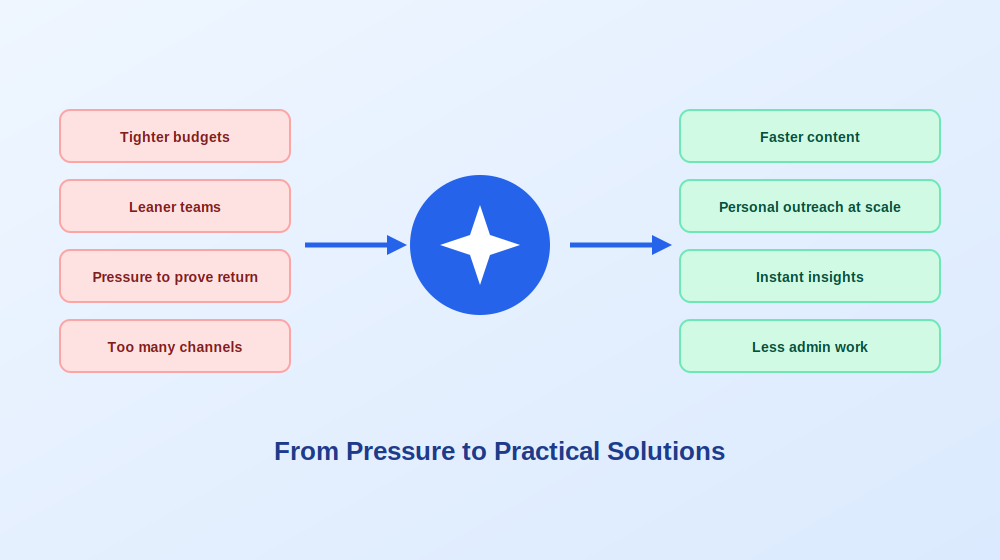
Marketers today juggle personalization demands, a flood of data, and campaigns spread across several channels. Add the constant pressure to come up with fresh creative ideas, and it is easy to hit a wall: you run out of ideas, you get stuck on a draft, and you cannot see performance data in real time.
AI helps in a handful of practical ways.
Faster content creation. Instead of spending hours on a cold email, newsletter, blog post, or ad, you can get a strong first draft in seconds and spend your time editing for tone and clarity.
Personalization at scale. AI can use details like job title, company size, or industry to make messages more relevant, so even a large send does not read like a generic blast.
Instant insights. Rather than digging through dashboards, you can ask for a quick summary of which campaigns convert, which subject lines work, and when engagement drops.
Less administrative work. Follow ups, meeting scheduling, lead scoring, and record updates can run in the background, leaving you free to focus on strategy.
Quicker testing. AI can suggest variations of subject lines, calls to action, and landing page copy, and help you iterate based on what actually performs.
Smoother multi channel work. It can help repurpose content and adjust the tone for each platform, so you are not rebuilding everything from scratch every time.
The key is matching the right kind of tool to the right problem, which is exactly how the rest of this guide is organized.
Problem One: Content Takes Too Long to Produce
B2B content is demanding. Whitepapers, case studies, newsletters, blog posts, and social updates all need to be accurate, polished, and on brand, and a small team can burn most of its week on drafting alone.
The solution: Combine AI writing and AI design to cut production time without lowering quality.
For writing, use a drafting assistant to produce first versions of emails, blog posts, product descriptions, and ad copy. Many writing tools let you define your brand voice and style guide, which keeps tone consistent across channels. They can also create content briefs, brainstorm headlines, and repurpose long content into shorter formats.
For visuals, AI design tools can turn a text description into graphics such as infographics, social images, timelines, flowcharts, and presentation slides. Many allow you to upload a data file and turn it into charts, apply your brand colors, fonts, and logo in one step, and export in multiple formats. This is a huge help for teams without a dedicated designer.
For polish, an AI editing assistant can catch grammar mistakes, tighten phrasing, and flag tone issues before anything goes out.
How to use these well:
1. Write a short brand voice guide and paste it into every writing prompt.
2. Treat AI drafts as a starting point and edit for originality, since tools can lean toward generic phrasing.
3. Review every design for accuracy, especially numbers and labels.
Problem Two: Outreach That Feels Generic
Decision makers receive a steady stream of cold messages. If yours looks like everyone else’s, it gets ignored, and manually customizing hundreds of emails is not realistic.
The solution: Use AI to personalize outreach based on real information about each prospect.
AI email assistants can analyze a prospect’s role, company, industry, and likely pain points, then draft tailored messages and follow ups. Some also check message quality, suggest better subject lines, rephrase awkward sentences, and support split testing of different versions. Video messaging tools add another layer, letting you record short personalized clips that build trust far better than text alone, with AI generating titles, summaries, and captions automatically.
How to use these well:
1. Feed the tool accurate, specific details about the prospect rather than only a job title.
2. Always review the final message, since AI sometimes states facts that are slightly off or loses your brand voice.
3. Test a few variations and keep notes on which tone gets replies.
Problem Three: Finding and Qualifying the Right Accounts
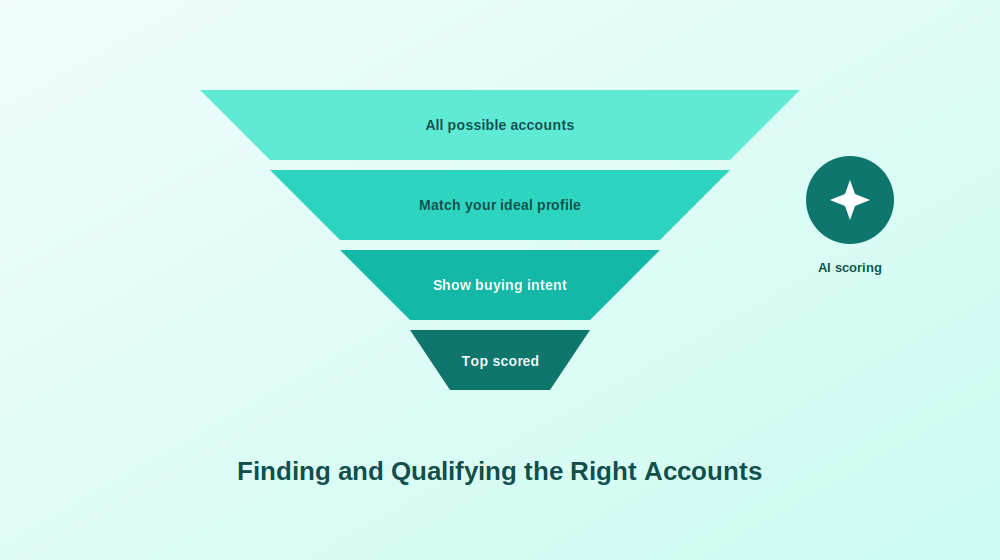
Spending time on poor fit leads is one of the costliest mistakes in B2B marketing. Without a clear picture of your ideal customer, campaigns drift toward whoever happens to respond rather than whoever is likely to buy.
The solution: Let AI help define your ideal customer profile and then find and score accounts that match it.
Ideal customer profile tools study your best existing customers and identify common traits, then help you build target lists of similar companies. Lead intelligence platforms go further by supplying contact details, company context, and signals such as hiring trends, funding news, leadership changes, and technology in use. Buyer intent data can point to prospects who are actively researching solutions like yours, so you can focus on people already in the market. Lead scoring then ranks prospects by behavior so sales follows up with the most promising first.
How to use these well:
1. Start by documenting what your best customers have in common, so the AI has something real to model.
2. Connect the tool to your customer database so data stays current.
3. Verify contact information regularly, since some data can be outdated and bounced emails hurt your sender reputation.
Problem Four: Repetitive Admin Eats the Week
Updating records, scheduling meetings, taking notes, chasing follow ups, and moving tasks between tools can swallow hours that should go to strategy.
The solution: Automate the repetitive layer so people can focus on thinking.
Meeting notes. AI note takers can record and transcribe meetings, extract action items, and make discussions searchable. For marketing teams, that means brainstorming sessions and webinars turn directly into goals, plans, and even content ideas. Be aware that accuracy can drop when several people talk over each other.
Workflow automation. Integration platforms let you connect your tools and build automations without code, such as creating a task from a message, sending a reply drafted by an AI model, or updating a record when a lead takes action.
Project management. AI enhanced planning tools can analyze project goals, recommend priority tasks, visualize progress in boards and timelines, and balance workloads across the team.
Team knowledge. Workspace tools with AI can draft copy, summarize research documents, and answer quick questions about how to approach a plan, while keeping templates for calendars, budgets, and strategy in one place.
How to use these well:
1. List the five tasks you repeat most often and automate the easiest one first.
2. Document each automation so others understand how it works.
3. Check outputs regularly, since an automation that quietly breaks can cause bigger problems than doing the task by hand.
Problem Five: Slow Replies to Website Visitors
Visitors who ask a question and wait too long usually leave. Meanwhile, sales teams lose time on conversations that were never going to convert.
The solution: Use AI agents to respond instantly and qualify leads before a human steps in.
AI chat assistants can answer common questions, ask qualifying questions, capture contact details, and route promising conversations to the right salesperson. Many support several channels at once, including website chat and popular messaging apps, and some handle multiple languages. Voice agents can handle calls, transcribe conversations, and generate notes and analytics for sales and support teams.
How to use these well:
1. Train the assistant on your real FAQs and product details, and expect to spend time on setup.
2. Keep a clear and easy path to a human for complex or sensitive questions.
3. Review conversation logs weekly to find questions the assistant cannot answer and improve it.
Problem Six: Keeping SEO and Social Consistent
Search visibility and social presence both reward consistency, yet they are easy to neglect when campaigns pile up.
The solution: Use AI supported SEO and social tools to keep both on track.
For SEO, research platforms help you find keywords, audit your site, track competitors, and analyze backlinks. Content optimization tools give live suggestions as you write, based on what already ranks, covering keywords, headings, structure, and length. Some also cluster keywords to help plan content calendars.
For social, scheduling platforms let you plan posts across professional networks and other channels, view a content calendar, and review performance. Larger teams may need deeper analytics, collaboration, and sentiment tracking, while smaller teams often do well with a simple, clean scheduler.
For repurposing, recording tools that automatically find the best moments in webinars, interviews, and podcasts and turn them into short clips make it easy to turn one recording into many social posts, transcripts, and blog content.
How to use these well:
1. Choose the one or two channels where your buyers actually spend time.
2. Use optimization suggestions as guidance, not rules, since writing only for a scoring tool can make content stiff.
3. Plan a repurposing step for every long recording before you hit record.
Problem Seven: Proving What Is Actually Working
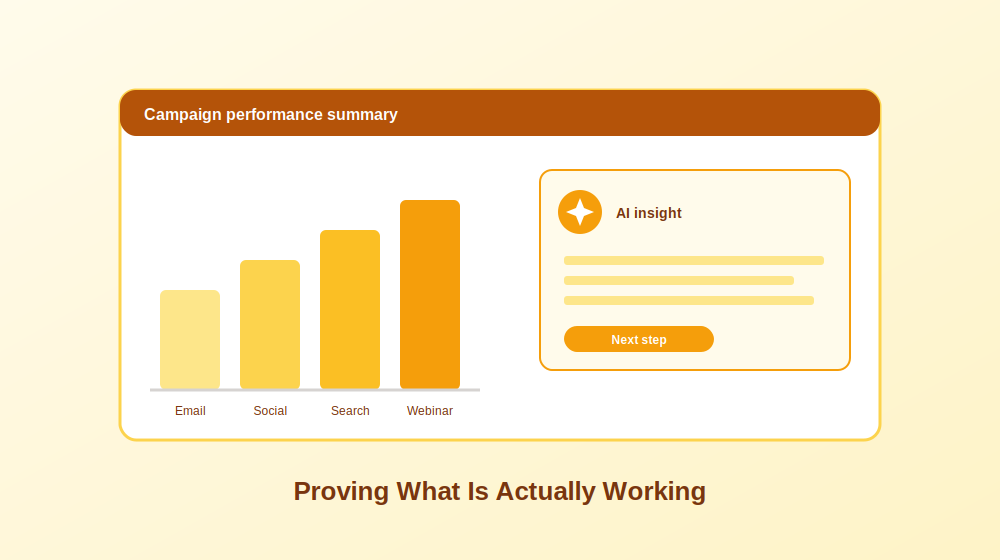
Everyone wants proof of return, but data often lives in scattered dashboards, and few people have time to interpret it.
The solution: Use analytics tools with AI summaries to turn numbers into answers.
Web analytics tools show who visits, where they come from, what they do, and where they drop off. Product and marketing analytics platforms add funnel analysis, retention reports, custom dashboards, and campaign comparisons over time. Some now include assistants that let you ask a plain question, such as how many customers upgraded last month, and receive an instant report without building anything. Survey and form tools help capture direct feedback, lead information, and event registrations in a format people actually enjoy completing.
How to use these well:
1. Decide which three or four metrics matter most before you open any dashboard.
2. Compare periods, such as this month against last month, to see real change.
3. Verify AI generated summaries against the underlying data before presenting them.
How to Choose the Right AI Tool for Your Team
More tools do not always mean better results. Sometimes they just complicate the process. Start by listing your marketing goals and the tasks that consume the most time. If design takes too long, look at a design tool. If content generation is the bottleneck, start with a writing assistant. If meetings and follow ups overwhelm you, try a note taker or automation platform.
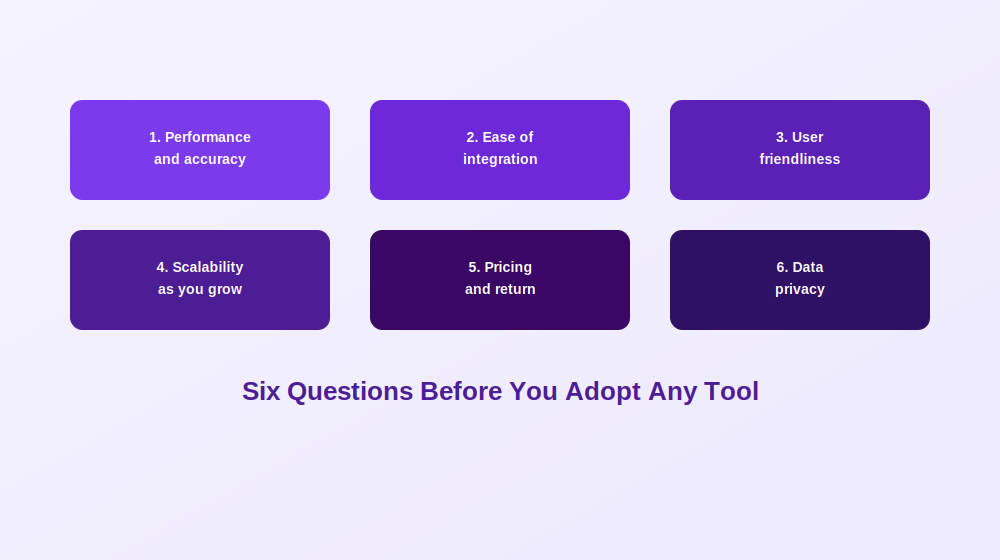
Before adding anything to your stack, consider these questions.
1. Performance and accuracy. Does it deliver reliable results for your actual use cases? Test it with real examples from your workflow before committing.
2. Ease of integration. Does it work with your existing customer database, email platform, and analytics? Look for native integrations or support for automation platforms.
3. User friendliness. Can your team get value without weeks of onboarding? Prefer tools with guides, tutorials, and responsive support.
4. Scalability. Will it still work as you add users, campaigns, and data? Check the upper limits before long term commitments.
5. Pricing and return. Is pricing transparent and in line with your budget? Estimate time saved or pipeline impact to judge whether it pays for itself.
6. Data privacy. Understand how the vendor handles your data, especially customer and prospect information, and whether it is used to train models.
Start small. Adopt one tool for one problem, measure the result after a month, and expand only when it has clearly paid off.
Frequently Asked Questions
Will AI replace B2B marketers? No. It handles repetitive and analytical work well, but strategy, positioning, relationships, and creative judgment still depend on people. Marketers who learn to use AI effectively will likely get more done than those who do not.
What is the best first AI tool for a small B2B team? Usually the one that targets your biggest time sink. For many teams that is a writing assistant or a meeting note taker, since both save time quickly with low risk.
How do I keep AI generated content on brand? Define a brand voice guide, include it in your prompts or tool settings, and edit every draft before publishing.
Is it safe to put customer data into AI tools? Be careful. Avoid sharing sensitive personal or confidential information unless the tool has proper security and the vendor’s data policies are clear. Use anonymized data when possible.
How do I measure whether an AI tool is worth it? Track time saved, campaign results, and cost before and after adoption. If you cannot show a clear benefit after a month or two, reconsider.
Can AI help with account based marketing? Yes. Ideal customer profile modeling, buyer intent signals, and lead scoring all support targeting the right accounts and personalizing outreach to them.
Final Thoughts
Nearly every B2B marketing team is leaning on AI in some form to automate and scale. The advantage goes to teams that choose tools based on their real bottlenecks rather than hype. Pick the problem that costs you the most time, match it with the right kind of solution, test it honestly, and build from there. Do that consistently, and AI becomes a dependable part of your workflow that frees you to focus on what machines cannot do: understanding your buyers, shaping a compelling story, and building lasting business relationships.
Almost every marketer now has access to an AI tool, yet the results people get vary wildly. One person produces a sharp email subject line in seconds, while another gets a bland, forgettable sentence and concludes the technology is overrated. The difference is rarely the tool. It is the prompt.
A prompt is simply the instruction you give an AI tool. Think of it as a creative brief written for a machine. When the brief is vague, the output is vague. When the brief is specific, the output is often surprisingly useful. This guide collects ready to use prompt templates organized around the problems marketers face most often, along with the reasoning behind each so you can adapt them to your own work.
Why Prompts Matter More Than the Tool
If you know what to ask, AI becomes a fast and flexible creative partner. If you do not, you end up producing the same generic content that is already crowding the internet. Strong prompts help you in several concrete ways.
Speed. Repetitive tasks such as drafting openings, summarizing long reports, or formatting notes can be handed off, leaving more time for strategy.
Creativity. A good prompt can break writer’s block by generating angles you had not considered.
Personalization at scale. One well written prompt can adapt a message for different audience segments and channels without losing consistency.
Brand consistency. A shared library of prompts lets a whole team produce copy that sounds like the same brand, even when new people join.
Better research. Prompts can help generate outlines, meta descriptions, and question ideas based on how people actually search.
Easy testing. One prompt can produce many variations of a headline or offer to test.
Simple repurposing. A single piece of content can become a social post, an email series, or a video script.
Lower costs. Smaller teams can handle more work, which is why many employers now look for marketers who know how to work with AI.
How to Write a Prompt That Works
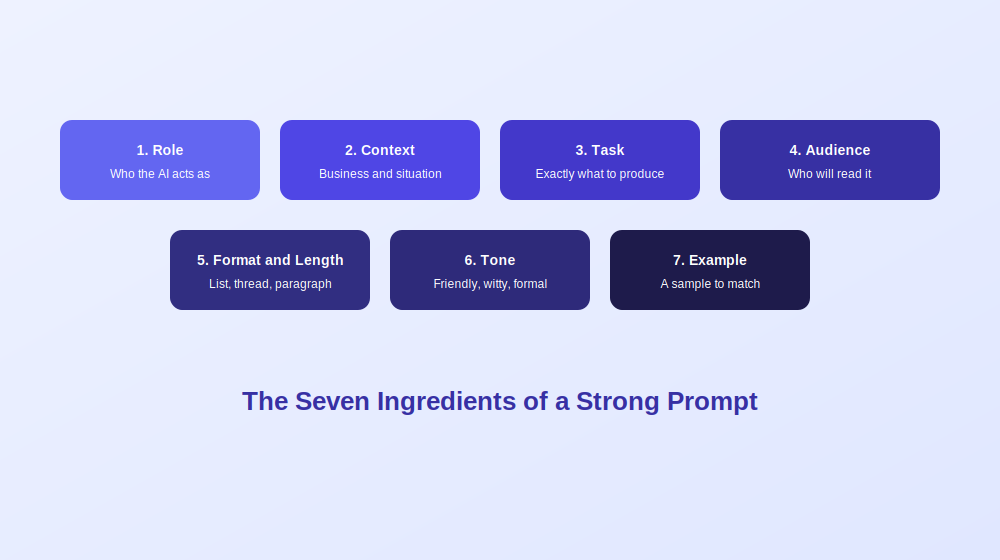
Before looking at templates, it helps to understand what makes a prompt effective. Most strong prompts contain the same handful of ingredients.
1. Role. Tell the AI who it should act as, such as an experienced email marketer or a freelance journalist pitching an idea.
2. Context. Explain the business, the product, and the situation. Context gives the tool something real to work with.
3. Task. State exactly what you want produced, such as five subject lines or a three paragraph email.
4. Audience. Describe who will read it, including their job, interests, and main frustration.
5. Format and length. Specify whether you want a list, a table, a thread, or a paragraph, and how long it should be.
6. Tone. Name the voice you want, such as friendly, witty, or professional.
7. Example. If you have a sample of writing you like, include it so the tool can match the style.
Compare two versions. The weak version says, “Write a caption for Friday’s post.” The strong version says, “Write a witty social caption under fifteen words aimed at young shoppers to promote our limited sneaker launch this Friday. Make it feel urgent but playful.” The second takes ten extra seconds and avoids several rounds of rewriting.
Problem One: Not Knowing What to Write About
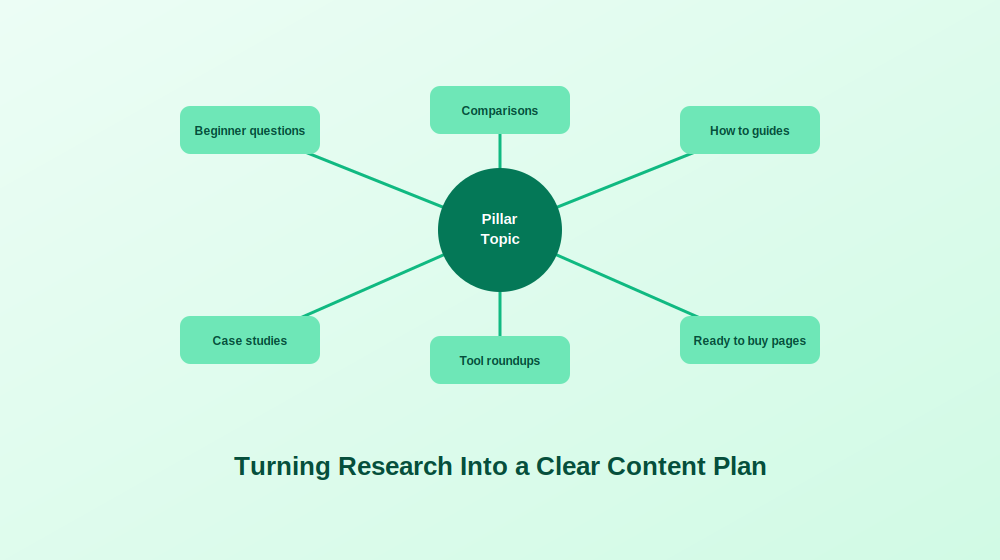
Many marketers do not struggle to write. They struggle to decide what is worth writing. Choosing topics, finding the right keywords, and structuring content around real search demand can eat a lot of planning time.
The solution: Use prompts to turn research into a clear plan. Try these templates and replace the brackets with your own details.
1. Keyword ideas by intent. “Suggest [10] long tail keyword ideas for the topic [topic], aimed at [audience] in the [industry] industry. Group them into beginner questions, comparison searches, and ready to buy searches.”
2. Topic cluster. “Build a topic cluster around [main topic] with one pillar page and [6] supporting articles. For each, give a working title and the search intent it serves.”
3. Funnel mapping. “Take the seed keyword [keyword] and sort related ideas into awareness, consideration, and decision stages. Suggest a content format for each, such as guide, comparison, or case study.”
4. Detailed blog outline. “Create an outline for a post on [topic] for [audience], written in a [tone] voice. Include a strong hook, clear section headings, practical takeaways, and a closing call to action.”
5. Outline with a framework. “Outline a post titled [title] using the attention, interest, desire, action structure, and suggest where internal links would fit naturally.”
6. Headline options. “Write [8] headline options for a post about [topic] that include the phrase [keyword]. Mix how to guides, lists, and question formats, and explain which would suit search and which would suit social.”
How to use these well: Always check keyword suggestions against a proper research tool, since AI can guess at search volume rather than measure it. Treat the output as a starting plan, then validate it.
Problem Two: Content That Sounds Flat or Generic
A draft can be accurate and still feel lifeless. Many marketers also worry that heavy rewriting will strip away their own voice.
The solution: Use prompts to refine instead of replace.
1. Tone shift. “Rewrite this paragraph in a more [conversational, confident, or witty] tone while keeping the meaning exactly the same: [paste paragraph].”
2. Notes to prose. “Turn these bullet points into a smooth paragraph with natural transitions and an engaging tone: [paste notes].”
3. Tighten and trim. “Cut this section by thirty percent without losing the key points, and remove any filler phrases: [paste text].”
4. Add specificity. “Find the vague or generic sentences in this draft and rewrite them with concrete detail, keeping only claims I can support: [paste draft].”
5. Summary blurb. “Summarize this article in under one hundred words and highlight the two most useful takeaways, so I can use it as a short intro.”
How to use these well: Edit small sections rather than whole articles. Large rewrites tend to flatten your personal voice, while targeted improvements keep it intact.
Problem Three: Emails That Nobody Opens
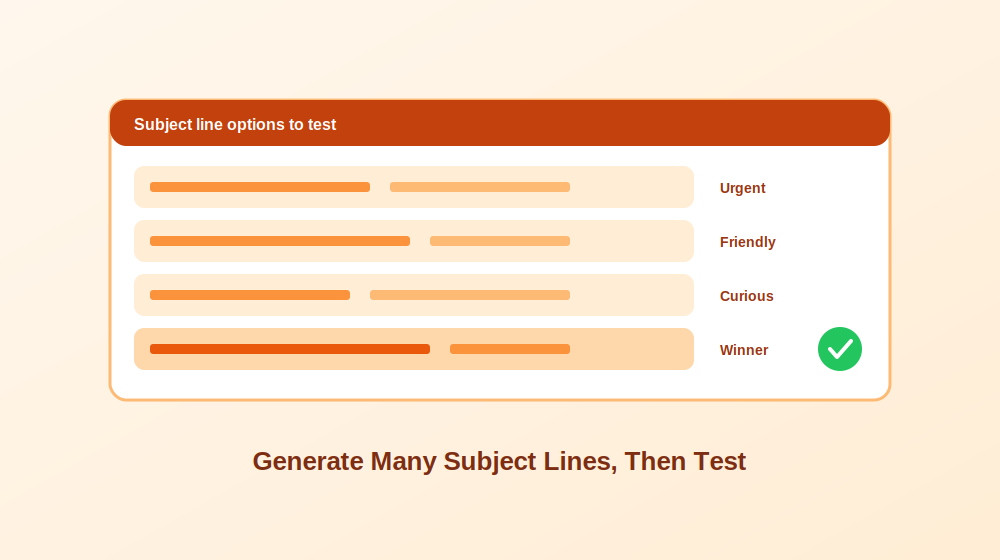
A great email is useless if nobody clicks it. Subject lines, follow ups, and win back messages are among the most important and most neglected parts of a campaign.
The solution: Generate many options quickly, then test them.
1. Subject line variety. “Write [6] subject lines for an email about [offer or event], each under [60] characters. Vary the tone across urgent, friendly, and curious.”
2. Curiosity without clickbait. “Write [4] subject lines that tease [benefit] and make readers curious without being misleading.”
3. Promotional email. “Write a three paragraph email promoting [product] to [persona]. Open with a hook, explain the main benefits, and end with one clear call to action.”
4. Lead follow up. “Write a follow up email to people who downloaded [resource] but did not take the next step. Show how it helps with [pain point] and invite them to [action].”
5. Re engagement. “Write a friendly email to subscribers who have not opened the last [3] messages. Include a quick question or useful resource and ask whether they still want to hear from us.”
6. Win back. “Write a win back email for former customers of [product]. Acknowledge why they might have left, offer a good reason to return, and include one call to action.”
How to use these well: Test two or three subject lines at a time and record which style wins with your audience. Over time you will learn which tone and length work best, and you can build that into your prompts.
Problem Four: One Piece of Content, Too Many Channels
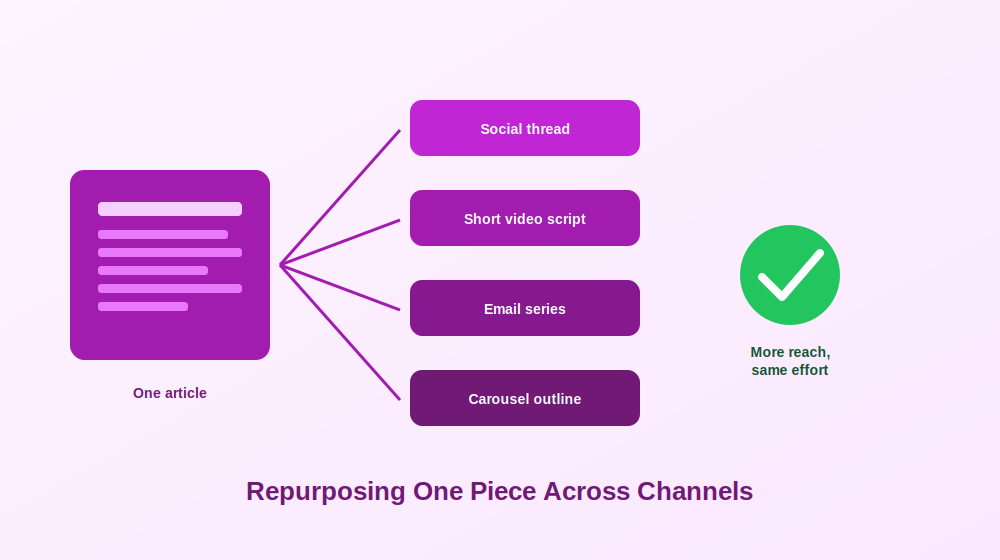
Creating content is only half the work. Distributing it across channels without sounding repetitive can feel endless, and many good articles never reach their audience because nobody has time to adapt them.
The solution: Treat each article as raw material and use prompts to repurpose it.
1. Social thread. “Turn this article into a thread of [6] posts. Keep it engaging, include one statistic and one memorable line: [paste article or summary].”
2. Professional network post. “Write a post summarizing the key lessons from this article. Open with a bold hook, use short lines, and end with a question to spark comments.”
3. Short video script. “Convert this section into a [60] second video script for [platform]. Make it punchy, conversational, and ready to read on camera.”
4. Carousel outline. “Outline a five slide carousel explaining [concept], with a short headline and one supporting line per slide.”
5. Email series. “Turn this article into a three email sequence for [audience], with each email focused on one idea and a different call to action.”
6. Multi format plan. “From this webinar transcript, produce five social posts, one blog recap, and two email teasers. Keep the message consistent but vary the wording.”
How to use these well: Always adapt the tone to the platform. A professional network rewards a more reflective voice, while a short video needs a faster, more casual one.
Problem Five: Ads and Calls to Action That Do Not Convert
Small wording changes in ads and buttons can have a large effect on results, yet writing many variations by hand is slow.
The solution: Use prompts to produce a spread of options for testing.
1. Search ad variations. “Write [3] search ad headline and description combinations for [product], one focused on benefits, one on features, and one on urgency.”
2. Social ad copy. “Write [4] ad variations for [persona] promoting [offer]. Each should include a hook, a value statement, and a call to action.”
3. Button text. “Suggest [8] call to action button texts for a landing page about [offer]. Mix urgency, value, and action words, and avoid generic phrases like learn more.”
4. Free trial page. “Write [3] button options for a free trial page, including one that stresses no risk and one that stresses instant access.”
5. Event sign up. “Suggest [5] button texts for a webinar page that build excitement and hint at what attendees will gain.”
How to use these well: Pick the most distinct options rather than the most similar ones, so your test actually teaches you something.
Problem Six: Planning, Briefs, and Reporting That Eat Your Week
Behind every campaign sits a pile of planning, briefing, and tracking work that rarely feels creative but has to be done.
The solution: Let prompts handle the structure while you supply the judgment.
1. Content calendar. “Build a monthly calendar with [4] blog posts, [8] social posts, and [2] email topics around [theme]. Suggest which channel each belongs to.”
2. Launch plan. “Create a launch plan for [product] covering pre launch, launch day, and post launch activities, with content ideas for each phase.”
3. Creative brief. “Write a creative brief for a [campaign type] aimed at [audience] to promote [offer]. Include objectives, key messages, deliverables, and a timeline.”
4. Tracking plan. “Suggest the key events and metrics I should track for [landing page or funnel], and how to name campaign parameters consistently.”
5. KPI selection. “Recommend [3] key performance indicators for this funnel and explain what each one tells me: [describe funnel].”
6. Weekly checklist. “Create a weekly task checklist for a solo marketer managing [type of business].”
How to use these well: Review plans against your real capacity. AI often suggests more activity than a small team can deliver, so trim the list to what you can do well.
Problem Seven: Checking Your Own Work
By the time a draft is finished, you are often too close to it to see its weaknesses. Proofreading and critical review are where AI can act as a fresh pair of eyes.
The solution: Ask it to review rather than write.
1. Proofread. “Proofread this email for grammar, flow, and clarity, and keep the tone [tone]. Do not change the meaning or add new claims: [paste email].”
2. Landing page review. “Review this landing page copy for clarity, consistency, and how well it drives sign ups. Point out jargon and overly long sentences: [paste copy].”
3. Argument check. “Look for weak arguments, unsupported claims, or contradictions in this article and suggest fixes: [paste article].”
4. Bias and jargon check. “Evaluate this piece for tone mismatch, bias, or too much jargon, and suggest changes that make it more accessible.”
How to use these well: Tell it explicitly not to invent facts. Then verify any statistics or claims it raises before you rely on them.
Prompts That Improve Your Prompts
One of the most useful tricks is asking the tool to help you write better instructions.
1. Prompt builder. “Write a detailed prompt that I can use to generate persuasive landing page copy for a product aimed at [audience].”
2. Prompt upgrade. “Improve this prompt so it is more specific and results focused, and explain what you changed: [paste prompt].”
3. Audience switch. “Adapt this prompt for a technical audience while keeping the tone casual and the instructions detailed.”
Common Mistakes and How to Avoid Them
Vague instructions. A request like “write a blog” returns something sensible sounding but generic. Add audience, angle, tone, and length.
Too many requests at once. Cramming a dozen tasks into one prompt lowers quality. Split work into separate prompts or sessions.
Ignoring the audience. If the tool does not know who it is writing for, it defaults to broad, safe language. Describe the reader.
Forgetting the format. Say whether you want a list, a table, a thread, or a short paragraph, so the output arrives ready to use.
Skipping iteration. The first answer is rarely the best. Follow up with adjustments, such as shorter, warmer, more specific, or more direct. Revising also forces you to add your own touch, which is a benefit rather than a burden.
Handing over your thinking. AI is a strong assistant but a poor autopilot. Relying on it for everything can dilute your brand and remove the nuance that only people bring. Leave room for editing, fact checking, and your own judgment.
How to Build Prompts Into Your Daily Workflow
You do not need to rebuild your process around AI. The new tool should fit the way you already work.
1. Find the repetitive tasks. List the jobs you repeat every week, such as topic ideas, subject lines, ad variations, and reports.
2. Write a prompt for the best candidate. Start with one task and a detailed prompt, then test it a few times.
3. Save what works. Store successful prompts in a shared document with notes on when to use each one.
4. Share with your team. A common library keeps tone and quality consistent across everyone.
5. Review regularly. Tools change quickly, so revisit your prompts every few months and update them as results shift.
6. Measure the outcome. Track whether prompts actually save time or improve results, and drop the ones that do not.
Frequently Asked Questions
What is an AI prompt in marketing? It is the instruction you give an AI tool to produce content, ideas, or analysis. The more specific it is about audience, tone, format, and goal, the better the result.
Why does my AI output sound generic? Usually because the prompt lacks context. Add details about your audience, brand voice, and goal, and include an example of writing you like.
Should I use the same prompt for every tool? The core structure works across most tools, but you may need small adjustments. Test a prompt in each tool you use and refine it based on results.
Can AI write all my marketing content? It can draft a lot, but you should always edit, fact check, and add your own perspective. Leaving everything to AI tends to produce bland work and can harm your brand.
How many prompts do I need in my library? Start with a handful for your most frequent tasks. Add more only when you find a repeated need, so the library stays useful rather than overwhelming.
How do I keep my brand voice consistent? Include a short description of your voice and one or two writing samples in your prompts, and store the best versions in a shared library for your team.
Final Thoughts
Collecting good prompts is the easy part. The real value comes from using them, testing them, and refining them until they fit the way you work. Start with the single problem that costs you the most time this week, pick one template, adapt it to your situation, and review the result honestly. Done consistently, that small habit turns AI from a novelty into a dependable part of your marketing process, while the creativity, judgment, and personality that make your brand yours stay firmly in human hands.

When ChatGPT first appeared, most marketers reacted with a mix of curiosity and suspicion. Could a chatbot really suggest a creative campaign, or write something that sounds like your brand? That hesitation did not last long. Today, marketing teams use it for idea generation, social planning, audience research, reporting, and even customer conversations. It has become less of a novelty and more of a creative assistant that takes on the grunt work.
But using it well is a different matter. Plenty of marketers have tried it, received bland and repetitive output, and given up. The truth is that ChatGPT rewards people who know which problems it can solve and how to guide it. This guide is organized around the problems marketers actually face and the practical solutions that work, so you can start getting real value from it right away.
What ChatGPT Can and Cannot Do for Marketing
ChatGPT is a conversational AI tool that generates human sounding text based on the instructions you give it. In a marketing setting, that translates into a few broad strengths. It can draft content such as blog posts, social updates, email newsletters, and case studies. It can support strategy by helping you outline customer personas, build content calendars, and brainstorm campaign angles. And it can speed up personalization by adapting messages for different audience segments.
What it cannot do on its own is understand your brand, your customers, or your goals. It only knows what you tell it, and it has no real world judgment about what will land with your specific audience. That is why the best results come from marketers who treat it like a capable junior colleague: fast, tireless, and useful, but in need of clear direction and careful review.
The Real Benefits Worth Aiming For
Before diving into solutions, it helps to be clear about what you are actually trying to gain.
Time saved. Drafting, summarizing, and reformatting are time sinks. Offloading the first pass frees you to focus on strategy and creative decisions.
Lower costs. Tasks that once demanded extra headcount, like routine drafting or basic customer replies, can be handled faster by a smaller team.
Scalability. A single marketer can produce content across websites, social channels, and email at a volume that used to require a bigger group.
Personalization. Messages can be tailored for different segments at different stages of the customer journey without writing every version from scratch.
None of these benefits are automatic. Each depends on using the tool deliberately, which is where the next sections come in.
Problem One: Staring at a Blinking Cursor
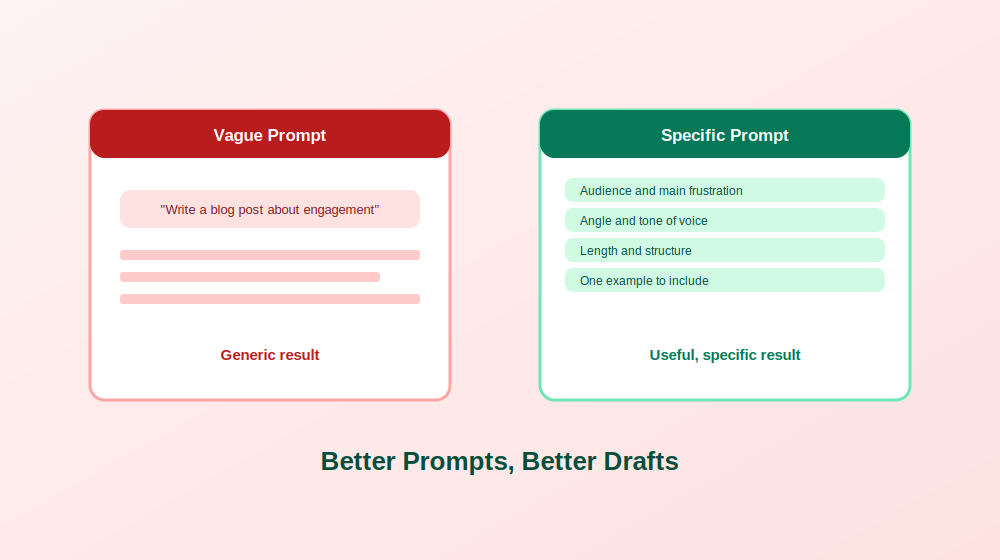
Good writing takes time. You think through the idea, put it into words, and rewrite until it sounds right. Often the hardest part is simply starting, and a blank page can burn an hour before a single useful sentence appears.
The solution: Use ChatGPT to produce a rough draft you can react to, then refine it. Editing something is almost always easier than creating it from nothing. Here are practical ways to apply it:
1. Write sales copy variations. Generate several pitch angles, landing page introductions, or outreach scripts for different buyer types, then keep the strongest pieces.
2. Find stronger wording. Ask for sharper synonyms, or request that a sentence sound more confident, more empathetic, or more direct.
3. Improve flow. Have it smooth the transitions between paragraphs so the piece reads like a conversation.
4. Match your brand voice. Paste in a sample of your writing and ask it to follow that tone, whether it is bold, witty, or plainly conversational.
5. Simplify complex points. Reword technical explanations so a broader audience can follow them.
6. Draft calls to action. Generate several action oriented options for blog posts, emails, or landing pages and test them.
7. Build content briefs. Request an outline with suggested headings, angle options, and related keywords.
8. Repurpose content. Turn a long article into social posts, email blurbs, or short video scripts.
The catch is the prompt. A request like “write a blog post about improving customer engagement” will give you generic content. Specific instructions produce specific results. Compare that with a prompt that names your audience, their main frustration, the angle you want, the tone, the length, and one example you would like included. The second version takes thirty extra seconds and saves you ten minutes of rewriting.
Problem Two: Not Really Knowing Your Customers
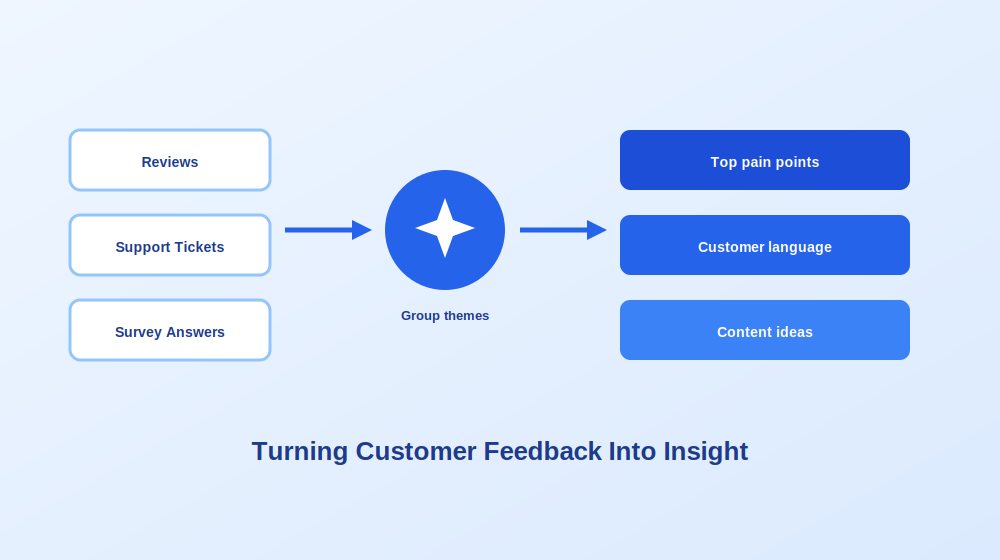
Marketing built on assumptions tends to miss. Many teams know their product well but have only a fuzzy picture of what their customers worry about, what words they use, and what they actually want.
The solution: Treat ChatGPT as a research partner that helps you organize and interpret what customers tell you. Useful approaches include the following.
Identify pain points. Paste in anonymized reviews, support tickets, or survey responses and ask it to group the most common frustrations. Then turn those themes into landing page copy, ad hooks, or lead magnets that speak directly to the problem. Leads who feel understood respond far better than leads who feel marketed to.
Learn content and channel preferences. Ask it to help you analyze which formats and channels your audience engages with, such as videos, articles, email, or social platforms, and what tone they prefer. Then match your outreach to those preferences, for example sending a short video demo by email to one segment and a written guide through a professional network to another.
Understand goals and motivations. Ask for ideas for templates, checklists, or benchmarks that help customers reach their goals. Offering something genuinely useful builds trust before you ever ask for a sale.
Analyze feedback and sentiment. Look at the actual words customers use to describe your product or their problem, then mirror that language in your messaging. Copy that sounds like the customer is more relatable and more credible.
Group leads by behavior. If you have engagement data, ask it to help you separate regular engagers from cold leads, and suggest follow ups suited to each stage of the journey.
One important caution applies to all of these: remove personal information before pasting anything in. Customer research should rely on anonymized or aggregated data, never names, contact details, or anything sensitive.
Problem Three: Slow Replies and Leaky Leads
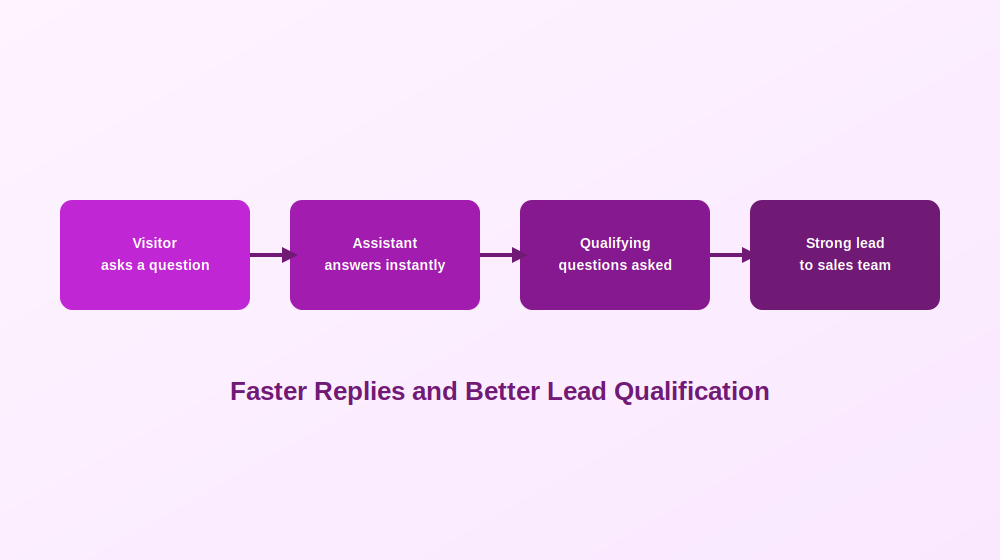
Visitors who wait too long for an answer tend to leave. Meanwhile, sales teams waste time on leads who were never a good fit, and customers expect timely, relevant responses at every stage.
The solution: Use ChatGPT based assistants and workflows to respond faster and qualify better.
Always on support. An assistant trained on your help content can handle frequently asked questions, resolve basic queries, and walk users through product features in real time. Instead of waiting for a human, leads get instant answers, which keeps them engaged and less likely to drop off.
Lead qualification. A conversational assistant can ask simple questions such as what brought a visitor to your site, what industry they work in, and what their biggest challenge is. That collects contact details and useful signals without friction, and it passes stronger leads to your sales team.
Personalized customer journeys. Based on past interactions, messages can be tailored, product suggestions can reflect earlier interests, and returning visitors can be welcomed back with a prompt to pick up where they left off.
Review responses. Many small business owners use it to draft thoughtful replies to customer reviews. Drafting is fast, but a person should always read and adjust the reply before it is posted, especially for negative reviews.
As businesses expand AI supported customer service, many also use dedicated conversational platforms to manage interactions across several channels and automate routine inquiries. Whatever setup you choose, keep a clear path to a human for anything sensitive, complex, or emotional.
Problem Four: Data That Nobody Has Time to Interpret
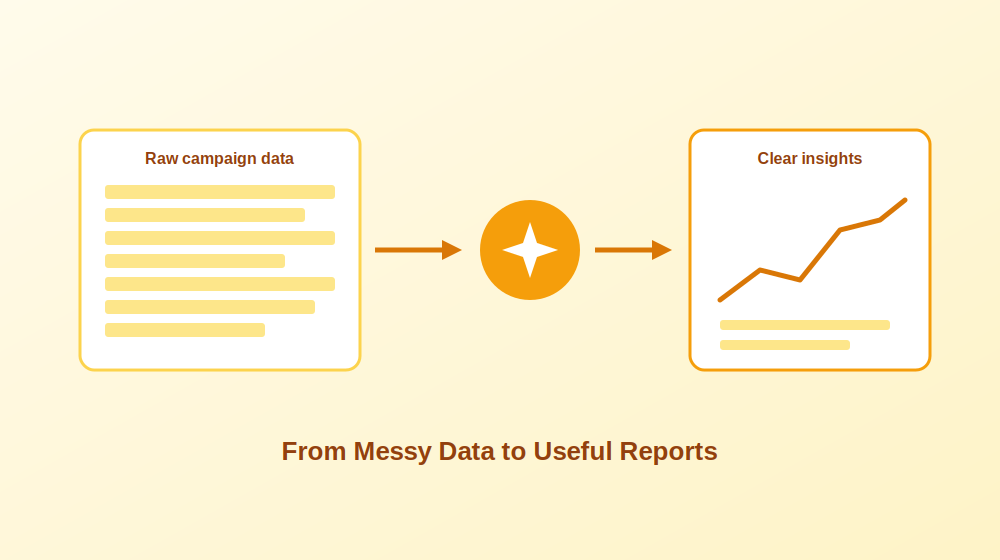
Dashboards, reports, and metrics are easy to collect and hard to act on. If nobody pulls out the right insight, the data is just noise.
The solution: Use ChatGPT as an assistant that helps you make sense of the numbers. You can give it survey results, campaign metrics, customer feedback, or email performance data and ask it to summarize patterns, point out what is working, and suggest next steps.
Funnel analysis. Describe where prospects drop off and ask for likely causes and improvements to test. This turns a vague problem into a short list of experiments.
Campaign analysis. Share results from ad platforms or email tools and ask it to highlight top performing assets, weak spots, and trends over time.
Trend spotting. Paste in raw campaign data and ask what changed, what stands out, and what deserves a closer look.
Automated reporting. Once the analysis is done, ask for a structured report that lists findings and recommendations based on your current strategy. This saves hours of formatting every reporting cycle.
Always double check calculations and conclusions yourself. ChatGPT can misread data or state a wrong total with complete confidence, so verify any numbers before they go into a presentation or decision.
Best Practices for Building It Into Your Workflow
A tool is only as useful as the way you use it. These habits make the difference.
Define clear use cases. Decide specifically what you will use it for, such as idea generation, first drafts, test variations, or simplifying messages, and what you will not. Avoid publishing final copy without editing, and keep sensitive brand communication under human oversight.
Connect it to the tools you already use. Automation platforms can link it with your customer management system, email tools, and spreadsheets. For example, a workflow can draft an email response based on lead activity, or turn spreadsheet data into a campaign summary. Start with one simple connection and expand once it works reliably.
Test it across different parts of your funnel. Try it for ad copy, summarizing webinar transcripts into articles, turning case studies into social posts, or rewriting posts with stronger opening lines. Each area will show different strengths.
Keep a library of prompts that work. When a prompt produces excellent results, save it with notes on what it is for. Over time this becomes a shared playbook that makes your whole team faster.
Invest a little in learning. A short course or some structured practice can help you understand what the tool does well, where it fails, and how to phrase requests more effectively.
Challenges to Watch For and How to Handle Them
ChatGPT is helpful, but relying on it completely is a mistake. Three challenges come up repeatedly.
Loss of the human touch. If every email and reply sounds overly polished, people notice. Excessive reliance on automation can strip away the warmth that makes interactions feel genuine. The fix is to use it to support communication rather than replace it. Automate repetitive steps, and keep people in charge of moments that call for empathy, context, or emotion.
Content quality. Readers recognize generic filler quickly: repetitive sentence structure, stock phrases about the ever changing digital landscape, and polished sentences that say nothing. They want real insight. Plan for a human editor to add your perspective, your examples, and your voice before anything goes live.
Data privacy. Be careful with sensitive information. Avoid pasting personal data or proprietary material into tools without secure systems, and make sure your usage complies with privacy rules that apply to your audience and region, particularly when third party plugins are involved.
Where ChatGPT in Marketing Is Heading
Several developments are already taking shape.
Personal shopping assistants will give real time product suggestions based on preferences and past behavior across websites, email, and messaging apps. Dynamic landing pages will adapt messaging, testimonials, and features to each visitor’s intent or referral source. Real time conversations at scale will let brands engage people across the full journey from awareness to post purchase support. Smarter reuse of customer content will help identify and repurpose reviews and social posts into testimonials, email snippets, and ad copy. Multilingual and local campaigns will go beyond direct translation to create culturally aware content for many regions. Continuous testing will automatically try variations of headlines, calls to action, and messaging, then optimize based on live feedback.
Marketers who experiment early and learn what works will be best placed to benefit as these capabilities mature.
Frequently Asked Questions
Can ChatGPT replace a marketing team? No. It speeds up drafting, research, and analysis, but strategy, brand judgment, creativity, and relationships still need people. It works best as an assistant that extends what a team can do.
How do I stop ChatGPT content from sounding generic? Give it specific instructions, including your audience, tone, angle, and examples, and then edit the draft with your own insights and phrasing. Remove stock phrases and add details only you would know.
Is it safe to put customer data into ChatGPT? Avoid personal or confidential information. Use anonymized or aggregated data, and check that your usage meets privacy requirements that apply to you.
What is the best marketing task to start with? Pick something repetitive and low risk, such as brainstorming topics, drafting social posts, or building content briefs. These offer quick wins and teach you how to prompt effectively.
Can ChatGPT help with SEO? It can help brainstorm topics, outline articles, suggest related questions, and draft meta descriptions. You should still use proper keyword research tools and review everything for accuracy and quality.
How often should I review what it produces? Always, before publishing. Check facts, tone, and claims, and make sure nothing contradicts your brand guidelines or legal requirements.
Final Thoughts
Marketing today asks you to ideate, experiment, and analyze constantly, and ChatGPT can take a real share of that load. It helps you draft campaigns, test new angles, pull insight from data, and free up time for the work that matters most: building genuine connections with your audience. The marketers who get the best results are the ones who give it clear direction, check its work, and keep experimenting as the technology and their goals evolve.

AI for B2B Marketing: Solving the Problems That Slow Teams Down

AI Prompts for Marketing That Actually Solve Real Problems

How to Use ChatGPT for Marketing Without Sounding Like a Robot

The Transformative Benefits of Artificial Intelligence in Modern Life

AI, SaaS, SEO & Link Building: The New Operating System of Digital Growth

Why Email Marketing Still Drives Real Business Growth in 2026
-
 Tech , SaaS6 months ago
The Transformative Benefits of Artificial Intelligence in Modern Life
-
 Tech , SaaS6 months ago
AI, SaaS, SEO & Link Building: The New Operating System of Digital Growth
-
 Email Marketing5 months ago
Why Email Marketing Still Drives Real Business Growth in 2026
-

 Business , Finance6 months ago
Business & Finance in the Modern World: Strategies, Trends, and Sustainable Growth
-

 Sports , Fashion6 months ago
Sports & Fashion: The Perfect Blend of Performance, Style, and Modern Lifestyle
-

 Business , Finance6 months ago
The New Economy: How Digital Innovation, Behavioral Finance, and Smart Systems Are Redefining Global Business
-

 Email Marketing6 months ago
Email Marketing in 2026: The Ultimate Strategy for Growth, Engagement, and Conversions
-

 Health , Education6 months ago
Health and Education: The Foundation of a Strong and Successful Society